Baton Desktop 0.3.0 — Import from other agents, run status, and GitHub button diagnostics
0.3.0 lets you bring your existing agent setup into Baton, and makes the progress of AI turns and the state of the GitHub button easier to understand.
Import from other agents
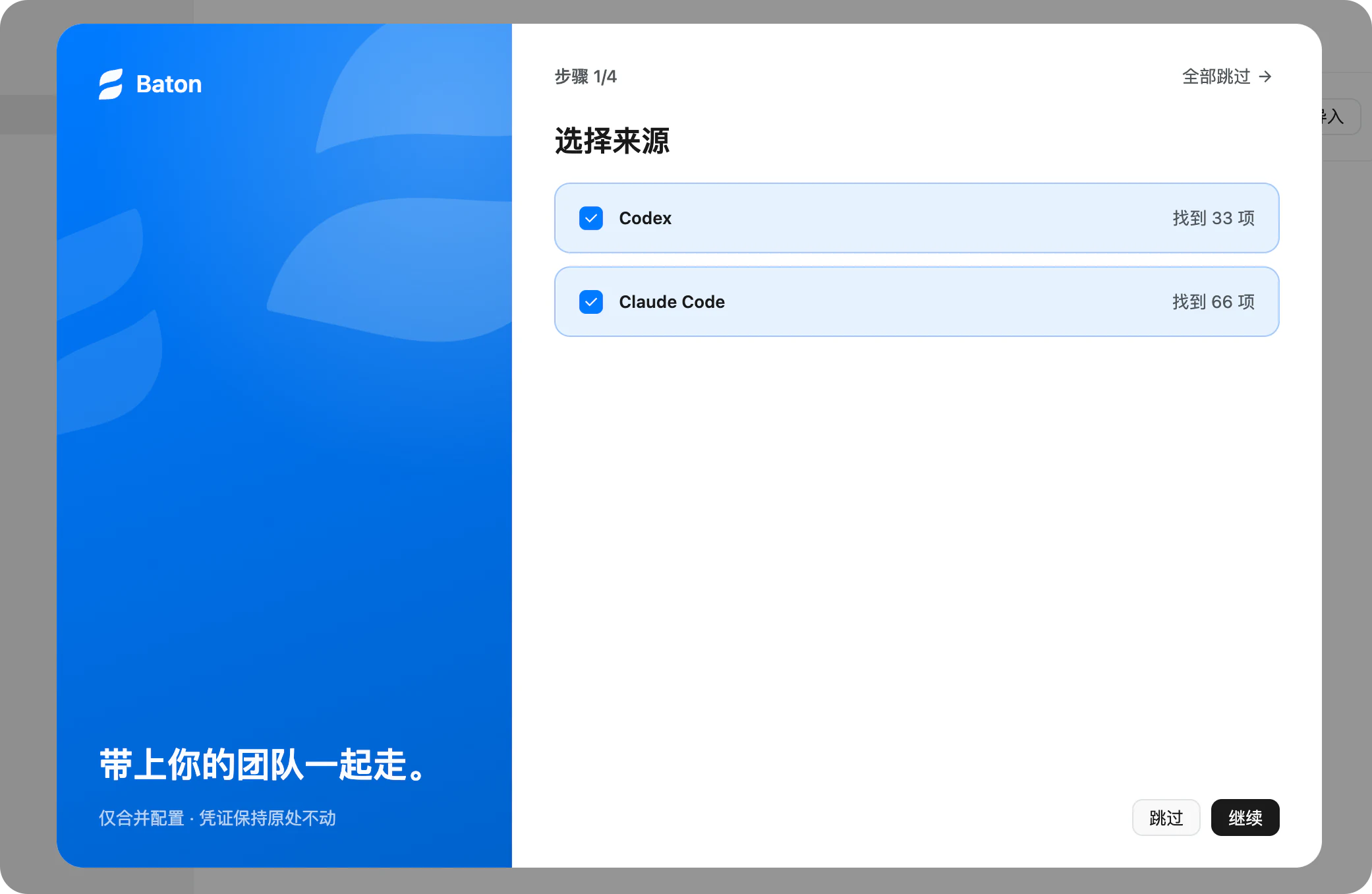
- New "Import from other agents": scans Codex and Claude Code on this computer and imports MCP servers, Skills, compatible settings (such as the default model), and projects.
- Four steps: choose sources → choose content → review → results. The results page lists imported, deduplicated, and skipped entries with reasons.
- Merge only: existing Baton settings are never overwritten, identical entries are deduplicated, and on conflict Baton keeps its current version.
- Credentials stay where they are and are never copied; MCP servers that contain credentials are skipped. Unsupported content such as memories, instruction files, Hooks, and slash commands is listed on the review step with the reason it is not imported.
- External worktrees of a project can optionally be imported as Baton workspaces; they are unticked by default.
- Baton prompts once on first launch, including after upgrading from an earlier version; you can open it again anytime from Settings.
(Thanks to @森森森在哪呢 for the suggestion.)
Run status for AI turns
- While a turn runs, a single status line shows "Working · what it is doing now", for example "Run npm test", with a timer. The step details are folded by default and open with a click.
- When the agent needs your answer, the status reads "Needs your input" and the question card appears directly, never folded away.
- When the turn ends it folds into "Worked for 2m 13s · N tool calls"; stopped or failed turns read "Stopped after …" or "Failed after …". The duration is saved in the conversation and survives a reload.
- If you expand or collapse a turn yourself, that choice is kept, and the end of the turn never folds it.
- Screen readers announce only state changes; the timer is no longer read out every second.
GitHub button diagnostics
- The GitHub button now names the exact cause, such as
GitHub Login Expired,GitHub Unreachable,Git Untrusted,Folder Missing, orNot a Git Repository, instead of a generic setup prompt. - Clicking the button explains the cause and offers the matching action: sign in again, retry, copy the fix command, or open Doctor.
- Sign-in status is checked against the active GitHub account, so an expired inactive account no longer causes a false warning.
Model catalog
- Refreshed the models.dev catalog and BYOK presets.
Check for updates in Baton, or download it from hecara.com.