Baton Desktop 0.2.0 — macOS (Apple Silicon) & Windows
0.2.0 marks the first official Windows (x64) release, reworks the workspace task model with parallel sub-tasks in temporary worktrees, launches the official Baton AI Cloud service, adds support for GPT-6.1-Sol and Sonnet 5.5, and brings extensive performance optimizations and design system consistency.
Windows First Release
Windows (x64) is now released alongside macOS (Apple Silicon) as a 0.2.0 stable build (Linux is not included in this release).
- Installation & System Integration:
- Modern NSIS one-click installer: single-user installation without UAC elevation prompts, launching immediately upon completion with a Microsoft YaHei UI interface.
- Automatically registers the
baton://protocol handler and thoroughly cleans up registry entries on uninstall. - High-resolution colored system tray icon customized for Windows (clearly visible on dark taskbars), supporting left-click to restore and focus the main window.
- Window close protection: prompts a native confirmation dialog if background terminal jobs, AI generation, or scheduled tasks are still running (prompts only when terminals are actively busy; idle shells do not block closing).
- Fixed Windows system notifications occasionally failing to activate or focus the application window when clicked.
- Hardened workspace, dependency cleanup, and skill tool sandboxes against cross-drive (e.g.
D:\) and UNC shared path traversal; unified the dangerous executable file denylist (.js, .vbe, .hta, .jar, .url, etc.) across link opening and tools.
- Modernized Terminal & Console Experience:
- Full adaptation for Windows ConPTY character reflow; supports
Ctrl+Shift+CandCtrl+C(when text is selected) for copy,Ctrl+V/Ctrl+Shift+Vfor paste, and a right-click context menu (Copy/Paste/Select All). - Quick-launch commands submit with a standard carriage return (
\r) instead of\n, fixing commands stalling in cmd/PowerShell without executing. - Accurately detects whether terminal tabs are running foreground processes to prevent false idle status and command overwrites; accurately tracks cmd working directory via OSC 7.
- When focus is in the terminal, keyboard chords such as
Ctrl+W(delete word),Ctrl+B,Ctrl+R(history search),Ctrl+_(undo), andCtrl+1/2/3are forwarded directly to the terminal PTY instead of being intercepted by window accelerators. - Global screenshot hotkeys (F1/F3/Ctrl+Shift+X) are disabled by default on Windows to avoid conflicts with system Help and VS Code; in-app F1 screenshot shortcut remains available.
- Hides the console window for all background AI child processes (Codex app-server, OpenCode serve, Cline/Grok ACP, Git, version checks, etc.) for quiet execution.
- Full adaptation for Windows ConPTY character reflow; supports
- Process Lifecycle & Tool Compatibility:
- Agent termination and task cancellation use
taskkillto terminate complete child process trees, preventing orphaned processes; fixed Project Run getting stuck in "running" state. - Added backoff retry logic for directory renames failing with EBUSY/EPERM due to Windows Defender real-time scanning locks; releases file watchers before deleting projects.
- BYOK
run_shellandstart_processtools enforce UTF-8 encoding (chcp 65001), fixing broken quote escaping and garbled output; Git commits use argument arrays for multi-line messages; file edit tools (replace_in_file, etc.) support CRLF line endings. - Refactored Windows launcher scripts into
.cmdshims to avoid PowerShell execution policy blocks and environment leakage; removed intrusive PATH modification; Node performs case-insensitive command lookups; OpenCode credentials resolve to the standard XDG directory; rejects Windows reserved device names (con,nul) or built-in commands as profile command names. - Injects host OS and cmd.exe syntax context into self-hosted model prompts so models avoid generating bash commands.
- Agent termination and task cancellation use
- Visuals & Typography:
- Bundles Noto Color Emoji vector font (WOFF2) on Windows, replacing Segoe UI Emoji for consistent cross-platform emoji and space icon rendering.
- Monospace code fonts fall back to Microsoft YaHei for Chinese characters, preventing fallback to SimSun.
- Refactored the Windows window shell with a macOS-style layered backdrop (transparent top bar and rail over an opaque base), eliminating border flickering and seam artifacts during window resizing; uses overlay scrollbars to eliminate dialog layout asymmetry.
Workspace Tasks & Parallel Sub-tasks
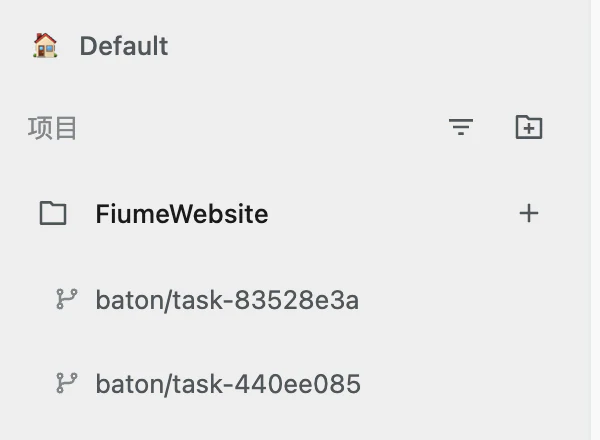
- One-Workspace Multi-Task Model: Workspaces can host multiple sequential tasks, unified under a single state pipeline (running, needs review, failed); a permanent "Tasks" tab in the right sidebar displays current tasks, history, and "New task", carrying forward prior task summaries.
- Ask Task Progress: Task cards feature an "Ask progress" button that spins up an independent, lightweight, read-only session to inspect task status without interrupting the main task state or execution thread.
- Parallel Sub-Tasks in Temporary Worktrees: Primary agents can spawn concurrent sub-tasks in isolated temporary Git worktrees via host tools, safely merging results back into the primary workspace via three-way merge upon completion.
- Unified Multi-Runtime Tool Support: Injects native task control host tools for Claude Code, Codex, Cursor, and BYOK; provides matching workspace task tools for Grok, Cline, and OpenCode via the local MCP Gateway HTTP Bridge.
Baton AI Cloud
- Zero-Config AI Without API Keys: Built-in official Baton AI Cloud provider enables out-of-the-box model access without personal API keys; supports switching between Global and China direct-connect acceleration lines; dynamically synchronizes available models from the cloud; provides friendly notices for insufficient balance and rate limits.
- Account Center Panel: Dedicated account view displaying email, avatar, connected line, credit balance, and expiration dates.
Scheduled Send
- Composer features a split send button supporting instant send or "Schedule send";
- Task scheduler automatically creates workspaces and dispatches tasks at designated times, restoring pending timers across application restarts;
- Scheduling dialog disables past dates and times (past time slots grayed out for today); time picker dropdown portals to the document body to prevent viewport clipping within dialogs.
Models & Runtimes
- Codex: Integrated GPT-6.1-Sol as the default model, bumping the codex runtime to
0.159.3. - Claude: Integrated Sonnet 5.5 as the default model and updated claude-agent-sdk.
- Cline: Refreshed curated model catalog with support for new providers including Xiaomi and xAI.
- Catalog Snapshot: Synchronized and refreshed the
models.devcatalog snapshot.
Interface & Design System
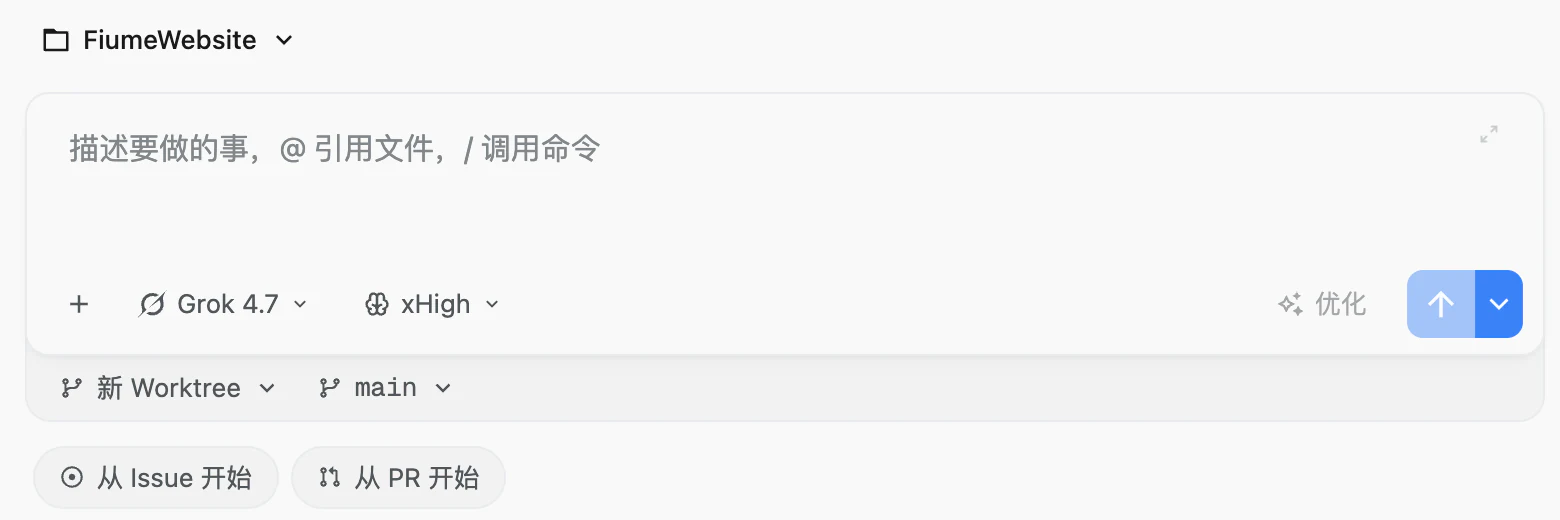
- New Workspace Composer: Replaces the floating dialog with a centered, in-pane persistent composer, with a docked tray for Local / Worktree mode and base branch selection, plus one-click cards for "Start from Issue" and "Start from PR"; placeholder reads "Describe what to do, @ to reference files, / for commands".
- GitHub Workflow Synchronized PR Merge: Directly promotes and highlights the Merge button for synchronized pull requests, supporting non-default merge methods.
- Control Sizing Tiers:
- Systematic control height tiers: inline controls
sm (24px), standalone buttons/dialog actionsmd (28px), form fields and toolbarslg (32px); - Standardized square icon buttons (IconButton) and icon sizes (14px inside buttons, 16px standalone); aligned auxiliary buttons beside inputs to 32px;
- Extracted shared
SearchFieldcomponent aligning Archive and Requirements search styles; board "New task" button aligned to 28px.
- Systematic control height tiers: inline controls
- Reasoning Effort Controls: Slider width adjusted to 224px with maximum level labeled "xHigh"; level label and Auto/Manual toggle aligned compactly on one row; hovering step dots displays clear level tooltips below (Low/Medium/High/xHigh), removing redundant header preview text.
- Sidebar & Navigation: Main navigation buttons refined to 72px icon-only squares without text labels for a cleaner look; Select dropdowns wider than their triggers align to the left edge; menus use solid backgrounds and shadows; fixed asymmetric scrollbar padding on macOS with persistent classic bars.
- macOS Branded DMG Window: New 540x400 Retina branded DMG mounting window featuring a soft brand glow, drag-and-drop indicator arrow, and bilingual instructions.
Performance & Architecture
- Hot-Path Streaming & Persistence Optimizations:
- Terminal tab runtime persistence (
persistDetectedRuntime) updates only a single tab record row rather than rewriting the full workspace snapshot; - Tab index eviction reads a single column instead of scanning the full workspace store, significantly reducing SQLite I/O;
- GitHub workflow status checks execute independent git commands in small concurrent waves, reducing main thread waiting time;
- Elapsed-turn clock ticks entirely inside its own indicator component, preventing timer updates from triggering expensive re-renders of the full AI conversation view.
- Terminal tab runtime persistence (
- Schema-Versioned SQLite Storage: Each database schema version uses an isolated SQLite database file (e.g.
baton-v26.db) and automatically seeds data from previous versions during upgrades, preventing database corruption across version switches. - Safe Workspace Archiving & Deletion: Before archiving or deleting a workspace, actively terminates running setup script process trees (such as
npm install), eliminating "directory not empty" error loops caused by lingering file handles. - Grok Mode Switching Fix: Fixed Grok (>=1.0.9) throwing
BATON_AI_ASK_READONLY_UNAVAILABLEduring Ask/Plan mode transitions by adopting the ACPsession/set_modeprotocol. - Legacy Cleanup: Terminal Claude quick launch runs official
claude --dangerously-skip-permissionsdirectly, removing obsoletebaton claudewrapper scripts; removed unused Claude Code Workbench IPC channels and provider CLI profiles; Doctor adds checks for Windows long path support. - Build System & Unsigned Windows Release: Added explicit build support for unsigned Windows releases (
ALLOW_UNSIGNED_WINDOWS_RELEASE=true) alongside complete Windows automated test suites. - Release Infrastructure: Added release infrastructure support for introducing a new platform into an existing update channel (release backend bootstrap-target).
Baton will update automatically the next time you launch it, or you can download the latest version at hecara.com. On Windows, since this build is not code-signed yet, SmartScreen may display "Windows protected your PC"—click "More info" and select "Run anyway" to proceed.